

A Simple CRM for Small Business: Track Clients in a Spreadsheet
You don’t need expensive software to stop losing track of leads. For a solo business or a small team, a simple CRM spreadsheet does the core job well: one place to see every client and prospect, what stage they’re in, what you promised, and when to follow up next. This guide shows the columns to use, how to set up stages and follow-up reminders, a few formulas that do the heavy lifting, and a worked example so you can see what the numbers tell you.
What a CRM actually needs to do
“CRM” stands for customer relationship management. Strip away the features of big platforms and a small business CRM has four jobs:
- Remember who people are — contact details and how you met.
- Show where each deal stands — from first inquiry to paid.
- Tell you what to do next — the next action and its date.
- Show patterns — where good clients come from and how many inquiries turn into work.
A spreadsheet handles all four. Where it falls short is automation, like logging emails automatically or syncing with a calendar. If you have fewer than a few hundred active contacts and a handful of new inquiries a week, that trade-off usually makes sense.
The columns for a simple CRM spreadsheet
Keep it to one row per contact or deal and resist adding columns you won’t fill in. A practical set:
| Column | What goes in it | Example |
|---|---|---|
| Name | Contact’s name | Dana Ortiz |
| Company | Business name, if any | Ortiz Bakery |
| Email / Phone | How to reach them | [email protected] |
| Source | Where the lead came from | Referral – Sam K. |
| Service / Product | What they’re interested in | Monthly bookkeeping |
| Stage | Pipeline stage (dropdown) | Proposal sent |
| Est. value | Expected deal value | $1,500 |
| Last contact | Date of last touch | 10/20/2026 |
| Next action | One specific step | Call to review proposal |
| Next action date | When to do it | 10/24/2026 |
| Notes | Short context | Wants to start in January |
Two columns do most of the work: Stage and Next action date. If every open row has both, nothing slips.
Set up pipeline stages with a dropdown
Free-typed stages turn into a mess (“sent prop,” “proposal,” “Proposal sent”). Use a dropdown instead — in Google Sheets, Data → Data validation; in Excel, Data → Data Validation → List.
A simple set of stages for a service business:
- New lead — they reached out or you were introduced
- Contacted — you’ve replied or had a first call
- Proposal sent — a quote or proposal is in their hands
- Won — they said yes
- Lost — they said no, or went silent after several follow-ups
- Past client — work is done; keep in touch for repeat work and referrals
Keep the list short. You can always split a stage later if you notice deals stalling there.
Make follow-ups impossible to miss
The biggest value of a CRM is a reliable follow-up habit. Three spreadsheet tricks help:
1. Highlight overdue follow-ups. Add conditional formatting to the Next action date column with a custom formula such as =AND($J2<>"", $J2<TODAY()) (adjust J to your column), filled red. Anything overdue jumps out when you open the sheet.
2. Create a “Today” view. Use a filter view showing only rows where Next action date is on or before today and Stage is not Won, Lost or Past client. Open it each morning and work top to bottom.
3. Always write the next action. “Follow up” is vague. “Email the revised quote with the January start date” is something you can do in five minutes.
Once a deal moves to Won, the follow-up shifts from selling to getting paid. Our guides on how to create a professional invoice and following up on an unpaid invoice cover that part of the relationship.
Add a small summary dashboard
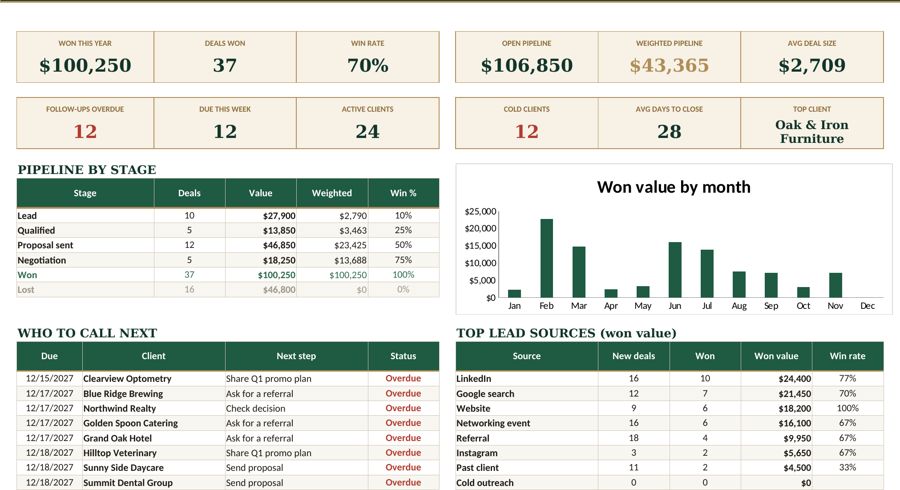
On a second tab, a few formulas turn your list into numbers. Assuming your data is on a tab named CRM with Source in column D, Stage in column F and Est. value in column G:
- Leads by stage:
=COUNTIF(CRM!F:F,"Proposal sent") - Value of open proposals:
=SUMIF(CRM!F:F,"Proposal sent",CRM!G:G) - Won value:
=SUMIF(CRM!F:F,"Won",CRM!G:G) - Leads by source:
=COUNTIF(CRM!D:D,"Referral*")(the asterisk matches anything after “Referral”)
Worked example: one quarter of leads
A freelance bookkeeper tracks every inquiry from July through September. At the end of the quarter, the sheet shows:
| Stage | Count | Est. value |
|---|---|---|
| Total leads logged | 25 | — |
| Reached “Proposal sent” | 8 | $11,200 |
| Won | 3 | $4,500 |
| Lost | 5 | $6,700 |
The three wins are worth $1,500 each, so $4,500 in total, and the five losses add up to $6,700 ($4,500 + $6,700 = $11,200 in proposals).
What the numbers say:
- Lead-to-client rate: 3 ÷ 25 = 12%.
- Proposal win rate: 3 ÷ 8 = 37.5%.
- Average won deal: $4,500 ÷ 3 = $1,500.
Now the Source column: 2 of the 3 wins came from referrals, even though referrals were only 6 of the 25 leads. That’s a 33% referral close rate (2 ÷ 6) versus about 5% for everything else (1 ÷ 19). The practical takeaway is to spend more time asking past clients for introductions and less time on channels that bring volume but few clients.
It also helps with planning. If the bookkeeper wants three new clients next quarter at the same rates, they need roughly 25 leads, or about 8 proposals. That turns a vague goal (“get more clients”) into a weekly target. Pair it with a view of when the money will actually arrive — see cash flow vs profit for why that timing matters.
Keep it clean: a weekly 15-minute routine
- Add every new inquiry the day it arrives.
- Update Stage and Last contact after every call or email.
- Clear the “Today” view; reschedule anything you can’t do.
- Move deals silent after three follow-ups to Lost, with a note on why.
- Once a month, glance at the summary tab and the Source column.
If you’d rather start from a ready-made layout with stages, dropdowns and a summary tab, Fyscale’s Client CRM template is built around this same structure. Either way, the habit matters more than the tool.
Bottom line
- One row per contact or deal, with a Stage dropdown and a Next action date on every open row.
- Highlight overdue follow-ups and work from a daily “Today” view.
- Use COUNTIF and SUMIF for a simple summary of leads, proposals and wins.
- Track Source — it shows where your best clients really come from.
- Spend 15 minutes a week keeping it current.
Tools mentioned in this article
Keep reading
This article is general information for US small businesses, not tax, legal or accounting advice. Check current IRS guidance or ask a qualified professional about your situation.