

How to Create a Professional Invoice: A Complete Checklist
An invoice is more than a bill. It is a record for your books, a document your client’s accounts team needs to process payment and, if something goes wrong, proof of what was agreed. A clear invoice gets paid faster. A vague one sits in someone’s inbox.
Here is exactly what to include and how to create a professional invoice in minutes.
The 12 details every invoice should include
- The word “Invoice” at the top, so nobody mistakes it for a quote.
- Your business name, address and contact details.
- Your client’s name and billing address — and a contact person if it is a company.
- A unique invoice number.
- Invoice date — the day you issue it.
- Due date — a real date, not just “Net 30”.
- A description of the work or products, line by line.
- Quantity, rate and line total for each item.
- Subtotal, sales tax (if applicable) and total due.
- Payment terms — when payment is due and any late fee you agreed on.
- How to pay — bank transfer details, payment link or check instructions.
- A purchase order number if the client gave you one.
Miss one of these and the most common result is a polite email from accounts payable asking for a corrected invoice — which resets the payment clock.
Invoice numbering that stays organized
Use a simple, sequential system and never reuse a number:
INV-2026-001,INV-2026-002, … (year + sequence), orCLIENT-001per client if you work with a few long-term clients.
Sequential numbers make it easy to spot a missing invoice, reconcile payments and answer “which invoice is this payment for?”
Write line items your client understands
Compare:
| Vague | Clear |
|---|---|
| Design work | Logo design — 3 concepts, 2 revision rounds |
| Consulting | Strategy session, Oct 6 (2 hrs × $120) |
| Products | Custom candles, lavender 8 oz × 24 @ $14.00 |
Clear descriptions prevent questions, and questions delay payment.
Choose payment terms on purpose
Common terms include due on receipt, Net 15 and Net 30 (payment due 15 or 30 days after the invoice date). Shorter terms get you paid faster; larger clients may insist on longer ones. Whatever you choose, show the actual due date on the invoice.
If you plan to charge a late fee, agree on it before you start the work and state it on every invoice — for example, “1.5% per month on balances over 30 days past due.” Check your state’s rules on late fees.
Make paying easy
The fewer steps between “I should pay this” and “paid”, the better:
- Include a payment link if you accept cards or online payments.
- Show bank details clearly for transfers.
- Offer more than one method when possible.
- Put the invoice number in the payment reference so you can match it.
Sales tax and other details
If you sell taxable products or services in a state where you are registered to collect sales tax, show the tax as a separate line. Rules differ by state and by what you sell, so check with your state’s revenue department or a tax professional. Online marketplaces like Etsy usually collect sales tax for you on marketplace orders; your own invoices are a different matter.
Send it the right way
- Export or print to PDF so the layout does not change.
- Name the file clearly:
INV-2026-014 Northline Studio.pdf. - Send it to the right person — ask who handles payables.
- Use a short email: what the invoice is for, the amount and the due date.
Track every invoice after you send it
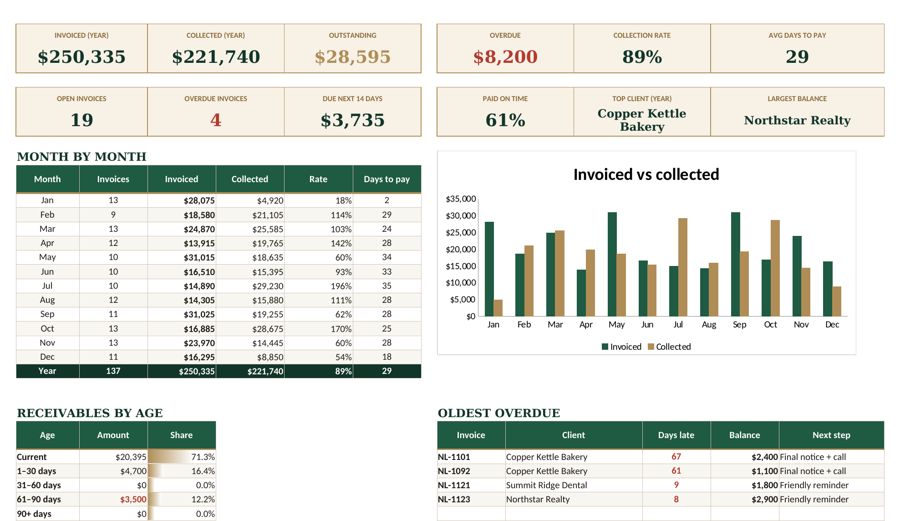
Creating the invoice is only half the job. Keep a simple log with invoice number, client, amount, date sent, due date, amount paid and status (sent, paid, overdue). Review it weekly. Overdue invoices get a friendly reminder the day after the due date.
Your invoice log also feeds your bookkeeping — see our step-by-step small business bookkeeping guide — and, if you freelance, helps you plan how much to set aside for taxes.
Quick invoice checklist
- [ ] Unique invoice number
- [ ] Invoice date and a real due date
- [ ] Your details and your client’s details
- [ ] Clear line items with quantity, rate and totals
- [ ] Tax shown separately (if applicable)
- [ ] Payment terms and late fee (if agreed)
- [ ] How to pay, including a reference
- [ ] PO number (if the client uses them)
- [ ] Sent as a PDF to the right person
- [ ] Logged in your invoice tracker
An invoice tracker that numbers invoices, fills in totals and flags overdue payments for you turns this checklist into a two-minute task.
Tools mentioned in this article
Keep reading
This article is general information for US small businesses, not tax, legal or accounting advice. Check current IRS guidance or ask a qualified professional about your situation.