

How to Plan a Month of Social Media Content in One Afternoon

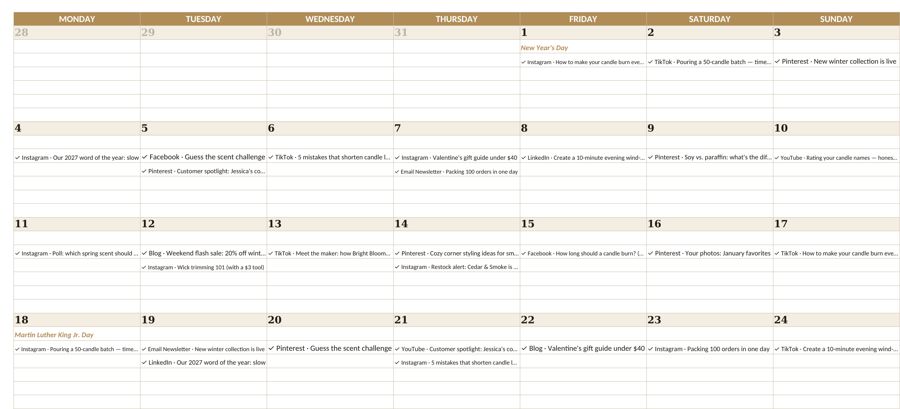
If posting on social media feels like a daily scramble for ideas, the fix is not more willpower. It is a social media content plan you build once a month, in a single focused afternoon. Small business owners who batch their content post more consistently, spend less time on it, and stop treating every post as a creative emergency. Here is a step-by-step method for planning a full month in about four hours, with a sample plan you can adapt.
Before you start: decide how much you will really post
The best plan is one you can keep. A realistic starting point for most solo businesses is three posts a week on one or two platforms. That is 12 posts in a four-week month, which is enough to stay visible without burning out.
Choose platforms based on where your buyers look, not where you feel you “should” be:
- Pinterest works well for products and how-to content people search for and save, including Etsy items and templates.
- Instagram suits visual products, behind-the-scenes and short videos.
- Facebook and Threads can be useful for community and conversation.
- LinkedIn fits B2B services and freelancers.
It is better to do one platform well than four badly.
The four-hour afternoon, step by step
| Time block | Task | Output |
|---|---|---|
| 0:00 – 0:30 | Review last month and the calendar ahead | Key dates and lessons |
| 0:30 – 1:00 | Choose pillars and fill the grid | 12 post slots with topics |
| 1:00 – 2:30 | Write all captions in one batch | 12 draft captions |
| 2:30 – 3:30 | Create or gather visuals | Images or short clips |
| 3:30 – 4:00 | Schedule and set up tracking | A queued month |
Step 1: Review last month and look ahead (30 minutes)
Look at your last month’s posts and note the two or three that got the most saves, shares, comments or clicks. Those topics deserve a repeat or a new angle.
Then list what is coming up: holidays, sales, product launches, shipping cut-off dates, or seasonal problems your customers have. If you sell physical products, line your posts up with what you actually have in stock; our guide to holiday inventory planning for Etsy sellers helps with that side.
Step 2: Pick content pillars and fill the grid (30 minutes)
Content pillars are the three or four themes you rotate through, so your feed has variety without you reinventing it each week. A simple mix for a small business:
| Pillar | Purpose | Posts per month |
|---|---|---|
| Educational | Teach something useful your customer cares about | 4 |
| Product or service | Show what you sell and how it helps | 4 |
| Behind the scenes | Build trust by showing how you work | 2 |
| Community | Answer questions, share customer wins (with permission) | 2 |
| Total | 12 |
Now map those 12 posts onto your calendar, for example Monday, Wednesday and Friday. Write a one-line topic in each slot. Place product posts near paydays, launches or key shopping dates.
Step 3: Batch-write every caption (90 minutes)
Write all 12 captions in one sitting. Switching between writing, designing and posting is what makes social media slow, so stay in “writing mode.”
A simple structure for each caption:
- Hook: one line that names a problem or a result.
- Value: two to four short sentences or a mini list.
- Call to action: one clear next step (save this, ask a question, visit the shop).
Keep a swipe file of hooks that worked before. Reuse the structure, not the exact words.
Step 4: Create or gather visuals (60 minutes)
Use a few consistent templates so every post looks like your brand without starting from scratch. Batch similar visuals together: all product photos, then all text graphics, then any short clips. Write descriptive alt text as you go so posts are accessible.
Only use images you own or have the right to use. Product photos of your own work are almost always the strongest option.
Step 5: Schedule and set up tracking (30 minutes)
Load everything into a scheduler (most platforms have a free built-in one) and add a link with tracking parameters where links are allowed, so you can see which posts send visitors to your shop or site.
Record every post in a simple sheet: date, platform, pillar, topic, link and results. Track it alongside your customers and leads if you use a simple CRM spreadsheet, so you can see which content brings real inquiries.
Leave room for timely posts
A plan is not a cage. Leave one or two open slots a month for news, questions from customers, or something fun that happens in your week. If you post them, great. If not, the planned content still goes out.
Budget your time and money like any other expense
Social media has costs even when it is “free”: your hours, design tools and any boosted posts. Put them in your monthly small business budget so you can judge whether the effort is paying off.
How to review the month
At the end of the month, spend 20 minutes answering:
- Which three posts got the most saves, shares, comments or link clicks?
- Which pillar performed best?
- Did any post lead to a sale, inquiry or email signup you can trace?
- What will you do more of, and what will you drop?
Focus on metrics tied to your goals. Likes are nice, but saves, clicks and inquiries are closer to revenue.
Bottom line
- [ ] Commit to a realistic number of posts on one or two platforms.
- [ ] Pick three or four content pillars and fill a monthly grid.
- [ ] Batch-write captions, then batch-create visuals.
- [ ] Schedule everything and log each post in a tracker.
- [ ] Review results monthly and feed the winners into next month’s plan.
If you want a ready-made structure, the Fyscale content planner template includes a monthly grid, pillar tracking and a results log in one spreadsheet.
Tools mentioned in this article
Keep reading


This article is general information for US small businesses, not tax, legal or accounting advice. Check current IRS guidance or ask a qualified professional about your situation.