

How to Track Business Expenses Without Accounting Software
There’s a shoebox, or a kitchen drawer, or a camera roll full of crumpled receipts. Every month you promise yourself you’ll sort it out “this weekend.” Then tax season arrives and the weekend turns into three.
Here’s the good news: you can track business expenses in a spreadsheet without accounting software, and it takes about 15 minutes a week. The secret isn’t a fancier tool; it’s a small, repeatable routine. This guide is for freelancers, makers, Etsy sellers and solo owners who want clean records without learning a new app. You’ll get a minute-by-minute weekly routine, a worked example week, and the monthly habits that keep everything tidy. Fifteen calm minutes a week is how you trade the shoebox for confidence.

Why a weekly expense routine matters more than you think
Tracking expenses isn’t just about taxes. It’s how you know your real profit, spot subscriptions creeping up and price your work with confidence. And the timing matters: a week-old receipt still has a memory attached (“that was printer ink for the client job”), while a ten-month-old one is a mystery.
A weekly rhythm also keeps the job small. At 15 minutes a week, the whole year adds up to about 13 hours, spread so thinly you barely notice, instead of one dreaded marathon.
Key idea: Small, boring, weekly beats big, heroic and once a year, every single time.
You need just three things in place:
- One business account and card, so business spending lives in one spot. If yours are mixed, start with how to separate business and personal finances.
- One capture spot for receipts: a phone photo album or email folder called “Receipts,” plus one envelope for paper.
- One simple sheet with the basics: date, vendor, amount, category, business purpose and a receipt check. That’s it; don’t over-design it.
How to track business expenses step by step: the 15-minute weekly routine
Pick the same slot every week, like Friday at 4 p.m. or Monday with your first coffee, and set a recurring reminder.
Minutes 0–2: Gather
Empty your wallet and receipt envelope, and open your “Receipts” photo album and email folder. Snap photos of any paper receipts you haven’t captured yet.
Minutes 2–7: Pull the week’s transactions
Open your business bank and card accounts and look at the last seven days. Add each new transaction to your sheet. Many banks let you download transactions as a CSV file you can paste in, which saves typing.
Minutes 7–11: Categorize and add a purpose
Give each line a category and a short business purpose (“mailers for holiday orders,” “client lunch, Alpine project”). Use the same category names every week; our list of small business expense categories is a good starting point. Tick the receipt column when a receipt matches.
Minutes 11–13: Flag anything odd
Look for personal purchases on the business card, duplicate charges, surprise subscriptions and cash spending you haven’t logged. Mark them so you can fix them, not forget them.
Minutes 13–15: Total and file
Glance at the week’s total and your biggest category. Then move this week’s receipt photos into a “Filed” folder. Done.

Example: one week for a jewelry maker
Picture Jess, a typical jewelry maker who sells on Etsy and at local markets. Here’s her Friday routine for one week:
| Date | Vendor / item | Amount | Category | Business purpose | Receipt? |
|---|---|---|---|---|---|
| Mon | Craft supply store | $64.20 | Materials | Beads and wire for holiday stock | Yes |
| Tue | Post office | $38.75 | Shipping | Labels for 6 orders | Yes |
| Wed | Design app | $12.99 | Software | Monthly plan for listing photos | |
| Thu | Mileage, 18 miles | $13.05 | Car (mileage) | Supplier and post office trips | Mileage log |
| Fri | Packaging supplier | $27.40 | Packaging | Mailers and tissue | Yes |
| Sat | Coffee shop | $16.80 | Meals | Meeting with a market organizer | Yes |
| Total | $173.19 |
A few notes from her 15 minutes:
- Mileage: 18 business miles × 72.5¢ (the 2026 IRS standard rate) = $13.05. She records the trip details in her mileage log rather than just the dollar figure.
- Meals: business meals are generally only 50% deductible, so her $16.80 coffee meeting means $8.40 is likely deductible. She logs the full amount and lets her category handle the 50%.
- Flag: a $43.10 grocery run went on the business card by mistake. She marks it “personal,” keeps it out of her business total, and makes a note to reimburse the business account.
Fifteen minutes, seven transactions, one mistake caught while it was still easy to fix.
The monthly and quarterly add-ons
The weekly routine does most of the work. Add two short check-ins:
- Monthly (about 20 minutes): match your sheet to your bank statement so nothing is missing or doubled. Our bank reconciliation guide walks you through it. This is also a good moment to note platform fees, like Etsy fees, from your monthly statement.
- Quarterly (about 10 minutes): total each category, compare with last quarter, and check that your tax set-aside still makes sense.
Keep your receipts and records organized by year. The IRS recordkeeping page explains what supporting documents to keep and why they matter. This is general information, not tax advice — confirm with a tax professional.
Common mistakes to avoid
- Waiting for the “perfect” system. A plain sheet you use weekly beats a beautiful one you never open.
- Logging amounts without a purpose. “$64.20, craft store” is fine today; in April, “beads for holiday stock” is what you’ll need.
- Skipping cash and mileage. They don’t appear on bank statements, so they’re the first things to go missing.
- Changing category names. “Shipping,” “Postage” and “Mailing” scattered across months make totals useless. Pick one.
- Letting personal spending blend in. Flag it the same week, every week.
Your 15-minute action plan
- [ ] Create a “Receipts” photo album and email folder
- [ ] Start a sheet with date, vendor, amount, category, purpose and receipt columns
- [ ] Log the last seven days of business transactions
- [ ] Add a business purpose to every line
- [ ] Flag anything personal or duplicated
- [ ] Set a recurring 15-minute weekly reminder at the same time each week
FAQ
Can I track business expenses without accounting software?
Yes. A simple spreadsheet works well for many freelancers and small businesses, as long as you update it regularly, use consistent categories and keep receipts. The key is a weekly habit, not the tool.
How often should I record business expenses?
Weekly is a sweet spot for most small businesses: often enough that you remember what each purchase was for, but not so often that it feels like a burden. Add a monthly check against your bank statement.
Do I need to keep paper receipts?
Clear photos or digital copies are generally fine for your own records, as long as they’re legible and organized. Ask your tax professional about anything specific to your situation.
The bottom line
You don’t need to love bookkeeping. You just need fifteen minutes, once a week, at the same time. Do your first session today with the last seven days, and next tax season you’ll open a tidy sheet instead of a shoebox.
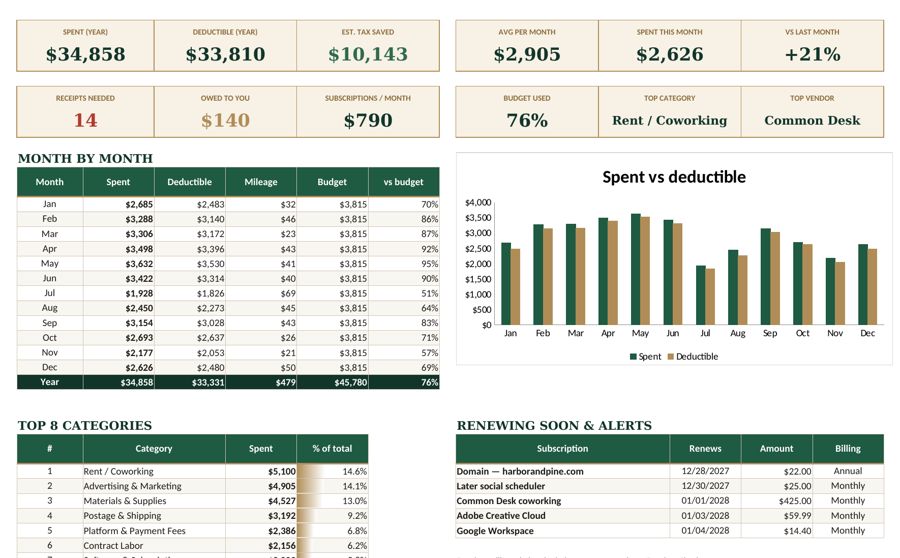
When you’re ready for a little more structure, the Fyscale expense tracker template gives you ready-made categories and monthly totals, so your weekly routine takes even less time.
Tools mentioned in this article
Keep reading



This article is general information for US small businesses, not tax, legal or accounting advice. Check current IRS guidance or ask a qualified professional about your situation.