

How to Track Inventory for an Etsy Shop in a Spreadsheet
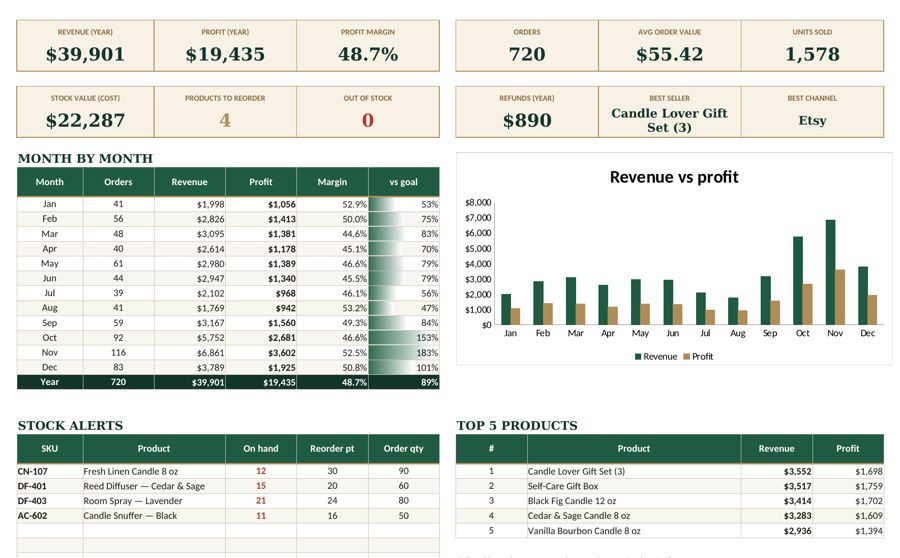
Etsy keeps a quantity number for each listing, but it does not tell you what you have on the shelf, which materials are running low or which products actually earn you money. A simple Etsy inventory spreadsheet fills that gap in an afternoon.
Here is how to build one that stays accurate without eating your evenings.
What an inventory spreadsheet should answer
- How many of each product do I have right now?
- What do I need to make or reorder this week?
- Which products sell fastest — and which earn the most profit?
- What is my inventory worth? (useful for taxes and planning)
If your sheet answers these four questions, it is doing its job.
Step 1: Build a product list
Give every product (and every variation that you stock separately) its own row with a short SKU — a code like CNDL-LAV-8 for an 8 oz lavender candle. Use the same SKU in your Etsy listing’s SKU field so you can match orders to stock.
| Column | Example |
|---|---|
| SKU | CNDL-LAV-8 |
| Product name | Lavender soy candle, 8 oz |
| Unit cost | $4.10 |
| Price | $22.00 |
| Starting stock | 40 |
| Reorder point | 12 |
Unit cost should include materials and packaging per item. If you make products yourself, add a fair labor cost as well — our guide to pricing explains why this matters.
Step 2: Log stock coming in
Create a Restock log tab. Every time you finish a batch or receive a delivery, add a row: date, SKU, quantity and cost. Never overwrite the starting stock number; add movements instead. That way you always have a history.
Step 3: Log orders going out
Create an Orders tab with one row per item sold: order date, order number, SKU, quantity, price, shipping charged and the sales channel (Etsy, website, market stall). You can type orders in daily or paste an export from your Etsy Shop Manager once a week.
Step 4: Calculate stock on hand automatically
On your product list, calculate stock on hand with a formula:
Stock on hand = starting stock + units restocked − units sold
In a spreadsheet, SUMIFS does the work: sum the restock quantities for this SKU, sum the sold quantities for this SKU and combine them with the starting stock. Now the number updates the moment you log an order.
Step 5: Add reorder alerts
Set a reorder point for each product — the stock level at which you need to start making or ordering more. A practical rule:
Reorder point = average daily sales × days it takes to restock + safety stock
If you sell 2 candles a day, it takes 5 days to pour and cure a new batch and you want a buffer of 4, your reorder point is 2 × 5 + 4 = 14. Then add a status column: when stock on hand is at or below the reorder point, show “Reorder”. Conditional formatting in red makes it impossible to miss.
Step 6: Track materials, too
Makers often run out of materials before they run out of finished products. Add a Materials tab with wax, wicks, jars, labels or whatever you use, with the quantity on hand and a reorder point. One glance before a busy weekend tells you what to buy.
Step 7: See which products make money
Add a few calculated columns per product:
- Units sold (this month and this year)
- Revenue = units × price
- Fees — Etsy charges a transaction fee on the item price and shipping, plus payment processing and a listing fee; estimate them per sale
- Profit per unit = price − unit cost − fees
- Total profit = profit per unit × units sold
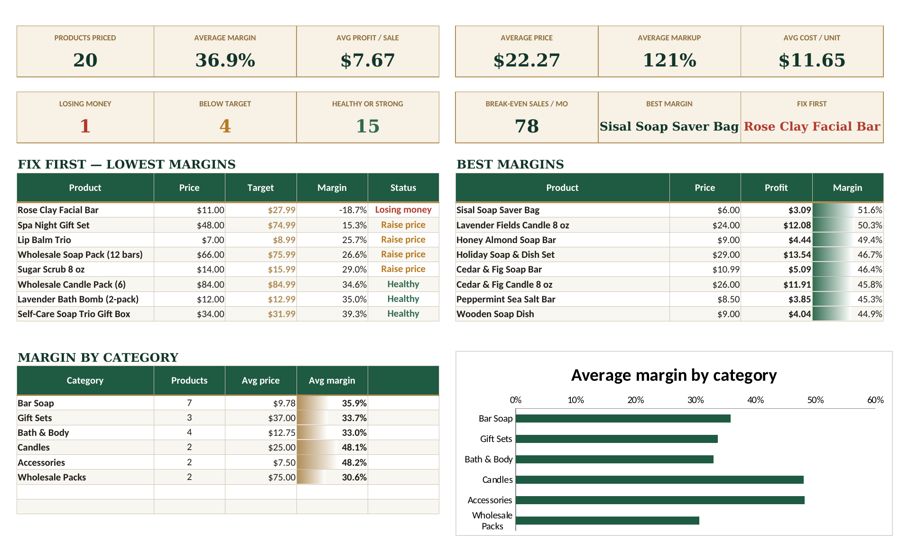
Sorting by total profit is often eye-opening: your best seller is not always your most profitable product.
Keep it accurate with a weekly routine
- Daily or after each order: log orders (or paste the export weekly).
- When stock arrives: add a restock row.
- Weekly: check the reorder list and compare stock on hand with Etsy listing quantities.
- Monthly: count the shelf for your top 10 products and fix any differences.
Inventory and your taxes
If you sell products, the cost of the items you sold usually goes into cost of goods sold on your Schedule C rather than ordinary expenses. Clean inventory records make that number easy to calculate. See our guides to small business bookkeeping and Schedule C expense categories to connect the dots.
The bottom line
An Etsy inventory spreadsheet does not need to be complicated: a product list with SKUs, a restock log, an orders log and a few formulas. Once stock on hand and reorder alerts update automatically, you will stop overselling, restock before the rush and finally see which products deserve more of your time.
Tools mentioned in this article
Keep reading



This article is general information for US small businesses, not tax, legal or accounting advice. Check current IRS guidance or ask a qualified professional about your situation.