

Gross Margin vs Markup: The Difference That Changes Your Prices

Margin vs markup is one of those topics that sounds like accounting trivia until it costs you money. Both describe the gap between what something costs you and what you sell it for, but they measure that gap against different numbers. Mix them up and you can set every price in your shop too low without noticing. This guide explains the difference, gives you the formulas and a conversion table, and shows how to price for the margin you actually want.
Margin vs markup: the core difference
Both start with the same dollar figure: price minus cost, the gross profit on one sale. The difference is what you divide it by.
- Markup compares gross profit to cost.
- Gross margin compares gross profit to price.
Markup % = (Price − Cost) ÷ Cost
Gross margin % = (Price − Cost) ÷ Price
Example: an item costs you $20 and you sell it for $30. Gross profit is $10.
- Markup = $10 ÷ $20 = 50%
- Margin = $10 ÷ $30 = 33.3%
Same item, same price, same $10. But one number says 50% and the other says 33%. Neither is wrong; they answer different questions.
Why the difference matters
Your profit and loss statement reports gross margin, because every line on a P&L is measured against revenue. If you set prices with markup but judge your business by margin, the two will never line up, and you may think you are hitting a target you are actually missing.
The most common mistake: an owner decides “I want a 40% margin,” then adds 40% to cost.
- Cost: $20
- Price with a 40% markup: $20 × 1.40 = $28
- Actual margin: ($28 − $20) ÷ $28 = $8 ÷ $28 = 28.6%
They wanted 40% and got 28.6%. To get a true 40% margin, the price must be:
Price = Cost ÷ (1 − Target margin) = $20 ÷ 0.60 = $33.33
Check: ($33.33 − $20) ÷ $33.33 = $13.33 ÷ $33.33 = 40%.
That gap is $5.33 per sale. On 1,000 sales a year, it is $5,330 of gross profit left on the table, simply from using the wrong formula.
Margin and markup conversion table
| Markup | Equivalent gross margin |
|---|---|
| 25% | 20.0% |
| 50% | 33.3% |
| 100% | 50.0% |
| 150% | 60.0% |
| 200% | 66.7% |
| 300% | 75.0% |
| Target gross margin | Markup needed |
|---|---|
| 30% | 42.9% |
| 40% | 66.7% |
| 50% | 100.0% |
| 60% | 150.0% |
The conversion formulas:
- Margin = Markup ÷ (1 + Markup)
- Markup = Margin ÷ (1 − Margin)
Notice that margin can never reach 100% (that would mean the item cost nothing), while markup has no ceiling.
Pricing for margin when fees are a percentage of price
For online sellers, there is one more wrinkle. Marketplace and payment fees are charged as a percentage of the sale price, so they grow when your price grows. Etsy, for example, charges a 6.5% transaction fee and, for US payment processing, 3% plus $0.25 per order. Our breakdown of Etsy fees explained covers the full list.
To build those fees into a margin-based price, use:
Price = (Cost + fixed fees) ÷ (1 − Target margin − percentage fees)
Example: product cost $20, target margin 40% after fees, percentage fees 9.5% (6.5% + 3%), fixed fee $0.25.
Price = ($20 + $0.25) ÷ (1 − 0.40 − 0.095) = $20.25 ÷ 0.505 ≈ $40.10
Check at $40.10:
| Item | Amount |
|---|---|
| Price | $40.10 |
| Product cost | −$20.00 |
| Transaction fee (6.5%) | −$2.61 |
| Processing (3% + $0.25) | −$1.45 |
| Profit | $16.04 |
| Margin | 40.0% |
Without accounting for fees, the earlier formula would have suggested $33.33, which leaves well under 40% once fees come out. (This example ignores shipping, which is also subject to the transaction fee if you charge it.)
Which should you use?
Use whichever you like for quick calculations, but set targets in margin. Margin matches how your P&L, your accountant and most industry benchmarks talk about profitability, and it makes it obvious how much of each dollar of sales you keep.
Markup is still handy in two situations:
- Wholesale and retail conversations, where buyers often talk about “keystone” (a 100% markup, which is a 50% margin).
- Quick mental math at the cost level, such as “materials times three.”
Just convert to margin before you decide whether a price is good enough.
Where margin fits in the bigger picture
Gross margin only covers the cost of the item itself. You still have fixed costs like software, insurance and your own pay. Pair your margin target with a break-even point calculation to see how many sales those margins need to cover your overhead. For makers, our guide on how to price handmade products adds labor into the cost side so you are not working for free.
Bottom line
- [ ] Markup divides gross profit by cost; margin divides it by price.
- [ ] Set your profit targets as margin.
- [ ] Price = Cost ÷ (1 − Target margin), not Cost × (1 + Target margin).
- [ ] If fees are a percentage of price, include them in the denominator.
- [ ] Recheck margins whenever material costs or fees change.
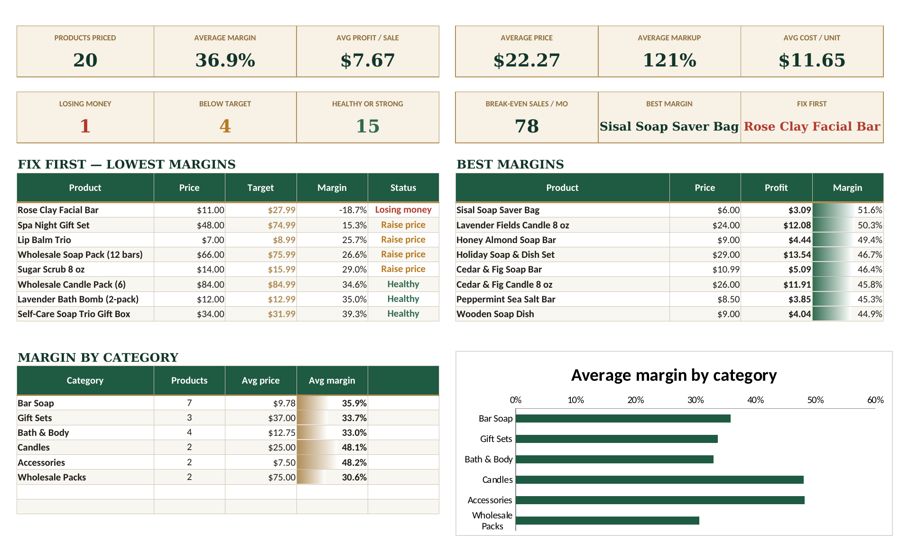
The Fyscale pricing calculator handles these formulas for you: enter your cost, fees and target margin, and it shows the price you need and the profit on each sale.
Tools mentioned in this article
Keep reading


This article is general information for US small businesses, not tax, legal or accounting advice. Check current IRS guidance or ask a qualified professional about your situation.