

Accounts Receivable Aging Report Explained (With Example)
You know that one client still owes you. Maybe two. But when you try to list exactly who owes what, and for how long, you end up scrolling through old emails and a half-updated spreadsheet, feeling a little sick about money you’ve already earned.
An accounts receivable aging report fixes that in one page. It lists every unpaid invoice and sorts it by how long it’s been overdue (current, 1–30 days, 31–60, 61–90 and 90+), so you can see at a glance which money is safe, which needs a nudge and which is at real risk. This guide is for freelancers, studios and small businesses that invoice clients. You’ll learn how to read the report, how to build one in a spreadsheet in minutes, and what to do with each bucket. Think of it as a map back to the money you’re owed.

What is an accounts receivable aging report?
Accounts receivable is money customers owe you for work or products you’ve already delivered. An aging report groups those unpaid invoices by age, measured from each invoice’s due date to the report date.
| Bucket | Meaning | Typical action |
|---|---|---|
| Current | Not yet due | Nothing, except a friendly reminder a few days before |
| 1–30 days past due | Recently late | Polite reminder email |
| 31–60 days past due | Clearly late | Phone call and a firm follow-up |
| 61–90 days past due | Seriously late | Pause new work, offer a payment plan |
| 90+ days past due | At risk | Final notice, decide on next steps |
The older an invoice gets, the less likely it is to be paid in full. That’s why the report matters: it tells you where your time chasing payments will do the most good.
Key idea: Unpaid invoices don’t get easier to collect with time, so the oldest bucket deserves your first phone call.
How to build an aging report step by step
You don’t need accounting software. A spreadsheet works fine.
- List every unpaid invoice. Columns: customer, invoice number, invoice date, due date, amount still owed.
- Pick a report date. Month-end is a good habit, for example October 31.
- Calculate days past due. In most spreadsheets:
= ReportDate - DueDate. A zero or negative result means the invoice is current. - Assign a bucket. For example:
=IF(D<=0,"Current",IF(D<=30,"1-30",IF(D<=60,"31-60",IF(D<=90,"61-90","90+")))), where D is the days-past-due cell. - Total each bucket. A pivot table or
SUMIFby bucket gives you the summary row. - Calculate each bucket’s share of the total, so you can see whether late money is growing over time.
- Repeat monthly and keep last month’s version to compare.
Your invoices should already show clear due dates; if they don’t, our guides on Net 30 payment terms and the invoice vs receipt vs statement difference will help tidy them up.

Example: a small design studio’s aging report
Take Chris, who runs a typical two-person design studio. Here’s the aging report on October 31, 2026:
| Customer | Invoice | Due date | Amount | Days past due | Bucket |
|---|---|---|---|---|---|
| Yoga studio | #205 | Nov 14 | $2,400 | 0 (not due) | Current |
| Gym | #207 | Nov 20 | $1,250 | 0 (not due) | Current |
| Bakery | #201 | Oct 25 | $1,800 | 6 | 1–30 |
| Bookstore | #203 | Oct 5 | $700 | 26 | 1–30 |
| Real estate office | #198 | Sep 20 | $950 | 41 | 31–60 |
| Dental office | #189 | Aug 15 | $600 | 77 | 61–90 |
| Cafe | #176 | Jul 10 | $400 | 113 | 90+ |
Summary:
| Bucket | Amount | Share of total |
|---|---|---|
| Current | $3,650 | 45.1% |
| 1–30 days | $2,500 | 30.9% |
| 31–60 days | $950 | 11.7% |
| 61–90 days | $600 | 7.4% |
| 90+ days | $400 | 4.9% |
| Total owed | $8,100 | 100% |
What Chris learns in two minutes: $3,650 is fine, $2,500 needs a polite reminder this week, and $1,950 is more than 30 days late ($950 + $600 + $400). His plan: call the real estate office and the dental office today, offer the dental office a two-payment plan, send the cafe a final notice, and pause new work for any client over 60 days until they’re caught up. One page turned a vague worry into a to-do list.
How to use each bucket
- Current: Send a short “friendly heads-up” a few days before the due date. It prevents a lot of late payments.
- 1–30 days: A polite reminder with the invoice attached and a payment link. Our unpaid invoice follow-up email templates make this a two-minute job.
- 31–60 days: Call. Ask what’s blocking payment and agree on a date.
- 61–90 days: Pause new work and offer a written payment plan.
- 90+ days: Send a final notice and decide whether to keep pursuing it. Our guide on late payment from clients covers escalation options.
If an invoice truly can’t be collected, talk to your tax professional. Under IRS rules, a business bad debt is generally deductible only if the amount was already included in your income, which usually isn’t the case for cash-method businesses; the IRS explains this in Topic 453, Bad debt deduction. This is general information, not tax advice — confirm with a tax professional.
Common mistakes to avoid
- Aging from the invoice date instead of the due date. A Net 30 invoice isn’t late on day 10. Measure from the due date, and label the report clearly if you choose otherwise.
- Forgetting partial payments. Show only the amount still owed, not the original invoice total.
- Running it once a year. Monthly is the minimum; weekly in busy seasons.
- Ignoring small old invoices. A $400 invoice at 113 days is still $400 you earned.
- Letting one client grow huge. If one customer makes up most of your receivables, a single late payment can squeeze your whole month.
Your 15-minute action plan
- [ ] List every unpaid invoice with its due date and balance
- [ ] Calculate days past due as of today
- [ ] Sort each invoice into a bucket and total each bucket
- [ ] Call the client with your oldest overdue invoice
- [ ] Send reminder emails to everyone in the 1–30 bucket
- [ ] Put a monthly aging-report reminder on your calendar
FAQ
What does an accounts receivable aging report show?
It shows every unpaid customer invoice grouped by how long it’s past due, usually current, 1–30, 31–60, 61–90 and 90+ days. The totals tell you how much money is owed and how much of it is at risk.
How often should I run an aging report?
Monthly is a good minimum for most small businesses, ideally at month-end. If you have many open invoices or a busy season, a quick weekly check helps you catch late payments sooner.
Is an aging report calculated from the invoice date or the due date?
For collections, aging from the due date is most useful because it shows how late each invoice really is. Some reports age from the invoice date instead, so check which method yours uses and stay consistent.
The bottom line
Money you’ve earned deserves to reach your bank account. An aging report doesn’t make chasing payments fun, but it makes it short, specific and calm. Build your first one today, make one phone call, and watch how quickly that oldest bucket starts to shrink.
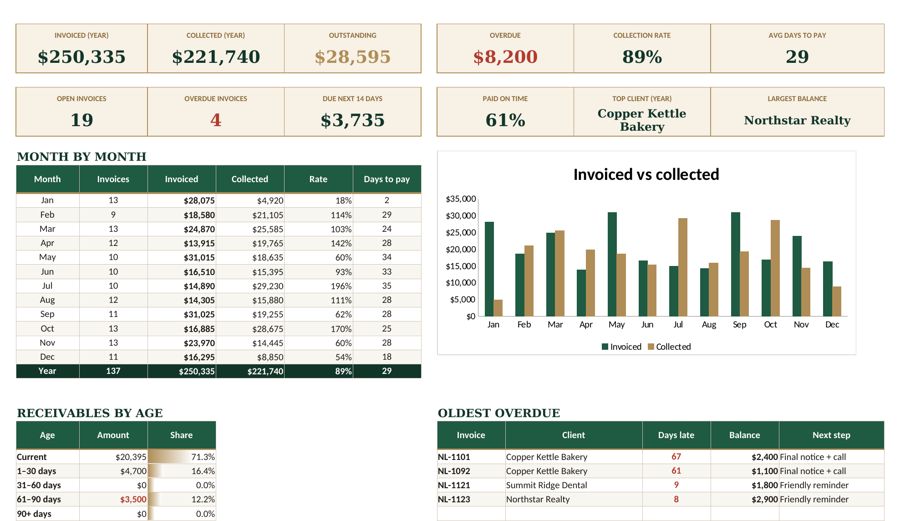
The Fyscale invoice template tracks due dates and balances for every invoice, so your aging buckets update themselves and the next follow-up is always obvious.
Tools mentioned in this article
Keep reading
This article is general information for US small businesses, not tax, legal or accounting advice. Check current IRS guidance or ask a qualified professional about your situation.