

The Eisenhower Matrix for Small Business Owners

It’s Monday at 9 a.m. A customer needs a reply, a supplier wants an answer, your tax payment is due Thursday, and a little voice reminds you that you still haven’t updated your best-selling listing. By Friday you’ve been busy every minute, and the thing that would actually grow the business hasn’t moved.
The Eisenhower matrix is a simple tool for exactly that week. It sorts every task by two questions, Is it urgent? and Is it important?, and gives each of the four boxes a clear action. This guide is for small business owners, freelancers and makers who wear every hat. You’ll see how to apply it to real small business tasks, with a worked weekly plan. Think of it less as a productivity trick and more as permission to stop reacting and start choosing.

What is the Eisenhower matrix?
| Urgent | Not urgent | |
|---|---|---|
| Important | Q1: Do now. Deadlines, real problems, things that cost money if ignored. | Q2: Schedule. Growth, planning, systems, relationships. |
| Not important | Q3: Delegate, batch or shrink. Interruptions and requests that feel pressing but don’t move the business. | Q4: Drop. Busywork and distractions. |
Urgent means it has a near deadline or demands attention now. Important means it moves your goals forward: revenue, customers, cash, health of the business. Most owners spend too much time in Q1 and Q3, and too little in Q2, which is where the business actually gets better.
Key idea: Urgent work keeps the business alive; important work is what makes it grow, so give it a time slot before the week fills up.
What each quadrant looks like in a small business
Q1: Urgent and important (do now)
- A quarterly estimated tax payment due this week
- An order that shipped to the wrong address
- A client invoice more than 30 days overdue
- Your checkout or download link is broken
Q2: Important, not urgent (schedule)
- Improving your best-selling listings or service page
- Building a cash flow forecast
- Writing a content plan for next month
- Following up with past clients for repeat work
- Monthly bookkeeping and reconciliation
Q3: Urgent, not important (delegate, batch or shrink)
- Most notifications and non-customer emails
- Meeting requests that don’t need you
- Formatting, data entry and routine admin
- “Quick favor” requests
Q4: Neither (drop)
- Endless tweaking of something that’s already good enough
- Checking stats several times a day
- Tools and tasks you keep “just in case”
Notice that much of Q1 is simply Q2 that got ignored. An unreconciled bank account becomes an urgent mess at tax time; a forgotten follow-up becomes an overdue invoice. Using templated unpaid invoice follow-up emails and regular step-by-step bookkeeping moves those jobs out of crisis mode.
How to use the Eisenhower matrix step by step
- Brain dump. Write down every task on your mind for the coming week. Don’t sort yet.
- Estimate time. Put a rough hour estimate next to each task.
- Sort. Assign each task to Q1–Q4. Be strict about “important”: does it affect revenue, customers, cash or legal obligations?
- Check capacity. Add up the hours and compare them to the hours you actually have.
- Act by quadrant: put Q1 at the start of your week, block calendar time for Q2, delegate or batch Q3, delete Q4.
- Review on Friday. What moved? What got pushed? What landed in Q1 that should have been handled earlier?

Example: a 25-hour week
Take Sam, a typical freelance bookkeeper with an Etsy side shop. She has 25 working hours next week and her brain dump adds up to 30 hours.
| Quadrant | Tasks | Hours |
|---|---|---|
| Q1 | Client month-end close, fix a broken digital download, chase a late invoice | 8 |
| Q2 | Rewrite two listings, plan December content, update cash forecast | 10 |
| Q3 | Inbox and DMs, formatting client reports, a “quick call” request | 7 |
| Q4 | Redesigning a logo that’s fine, rechecking shop stats | 5 |
| Total | 30 |
Her plan:
- Q1: Do all 8 hours Monday and Tuesday.
- Q2: Block 10 hours across Wednesday and Thursday mornings.
- Q3: Hand report formatting (4 hours) to a virtual assistant at $25/hour, a $100 cost, and batch the remaining 3 hours of inbox and calls into two 1-hour sessions, so 2 hours of her time.
- Q4: Drop all 5 hours.
Her own hours: 8 + 10 + 2 = 20 hours, leaving a 5-hour buffer for surprises instead of a 5-hour overload. Delegating cost $100 and freed 4 hours for higher-value work. Same person, same week, completely different Friday.
Tips that make it stick
- Protect Q2 first. Put Q2 blocks on your calendar before the week fills up. If Q2 only gets “leftover” time, it never happens.
- Batch Q3. Check messages at set times instead of all day. Customers are usually fine with a reply within a few hours.
- Use templates. Saved replies, invoice templates and checklists shrink Q3 tasks.
- Turn recurring Q1s into Q2 systems. If the same fire keeps starting, schedule the prevention.
- Keep the matrix visible. A single page or a sheet with four columns works better than a fancy app you won’t open.
Common mistakes to avoid
- Calling everything important. If more than a third of your tasks are Q1, your definition is too loose, or Q2 has been neglected for a while.
- Ignoring time estimates. A sorted list that needs 40 hours in a 25-hour week is still an overload.
- Never delegating. Even small, cheap help or simple automation can free hours for work only you can do.
- Sorting once a month. Priorities shift; a weekly sort keeps the matrix honest.
Your 15-minute action plan
- [ ] Write down every task on your mind for the next seven days
- [ ] Add a rough hour estimate to each one
- [ ] Sort each task into Q1, Q2, Q3 or Q4
- [ ] Delete or postpone two Q4 tasks right now
- [ ] Block one 2-hour Q2 session on your calendar this week
- [ ] Set a 10-minute Friday review reminder
FAQ
What are the four quadrants of the Eisenhower matrix?
Q1 is urgent and important (do it now), Q2 is important but not urgent (schedule it), Q3 is urgent but not important (delegate, batch or shrink it), and Q4 is neither (drop it).
How do I decide if a task is important?
Ask whether it affects revenue, customers, cash or a legal obligation. If it doesn’t move one of those, it’s probably not important, even if it feels pressing.
Can I use the Eisenhower matrix in a spreadsheet?
Yes. Add columns for task, hours, urgent (yes/no) and important (yes/no), then let a simple formula assign the quadrant. Sorting by quadrant gives you a ready-made weekly plan.
The bottom line
You’ll never clear every task, and that’s fine. The goal is to make sure the work that grows your business gets a real slot on the calendar. Spend fifteen minutes sorting this week, protect one Q2 block, and notice how different Friday feels.
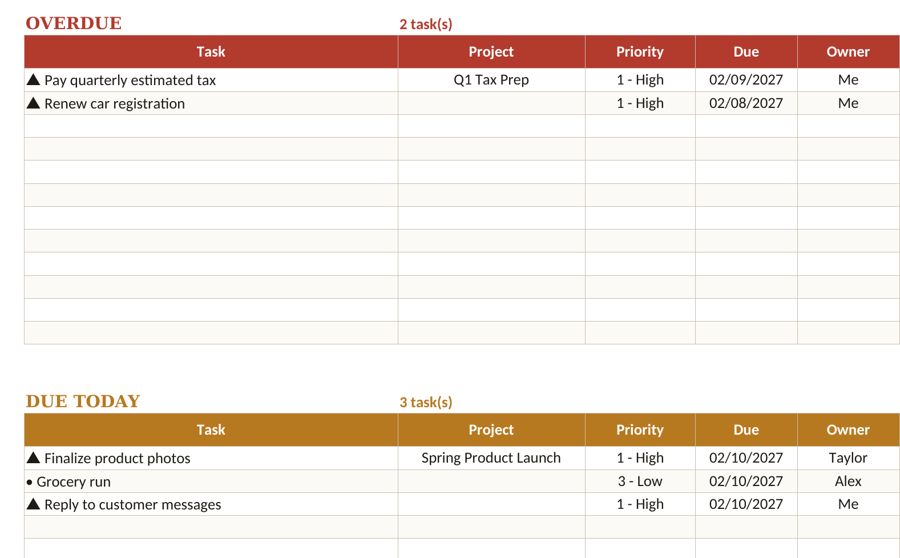
If you want a ready-made place to sort and schedule your week, the Fyscale task planner template includes an urgent/important view alongside a simple weekly to-do list.
Tools mentioned in this article
Keep reading



This article is general information for US small businesses, not tax, legal or accounting advice. Check current IRS guidance or ask a qualified professional about your situation.